52/17 and 50/10 Timers: Set Them Up in Tallydial
Twenty-five minutes is barely enough to load a codebase into your head or pick up the thread of a draft. If the timer rings just as you get going, try longer intervals. Here is how to set them up in Tallydial, a free pomodoro timer that tracks time per task, and how to tell whether they helped.
What 52/17 and 50/10 mean
The first number is minutes of focus, the second minutes of break: 52/17 is 52 minutes of work, then 17 off.
The 52/17 figure comes from DeskTime, a time-tracking app. In 2014 it looked at its own users' activity data and reported that its most productive tenth worked about 52 minutes at a stretch, then took about 17 minutes off. When DeskTime repeated the analysis on 2021 data, it reported 112 minutes and 26. These are observations about one tool's users, not a controlled study, and they don't show the rhythm caused the productivity. Treat it as something to try.
50/10 has no single origin: it is the classic 25/5 doubled, and a cycle fills an hour. The Pomodoro Technique guide covers the original method.
Set 52/17 in Settings
There are no presets: custom pomodoro lengths are typed in.
- Open Settings (on a phone, the Settings tab).
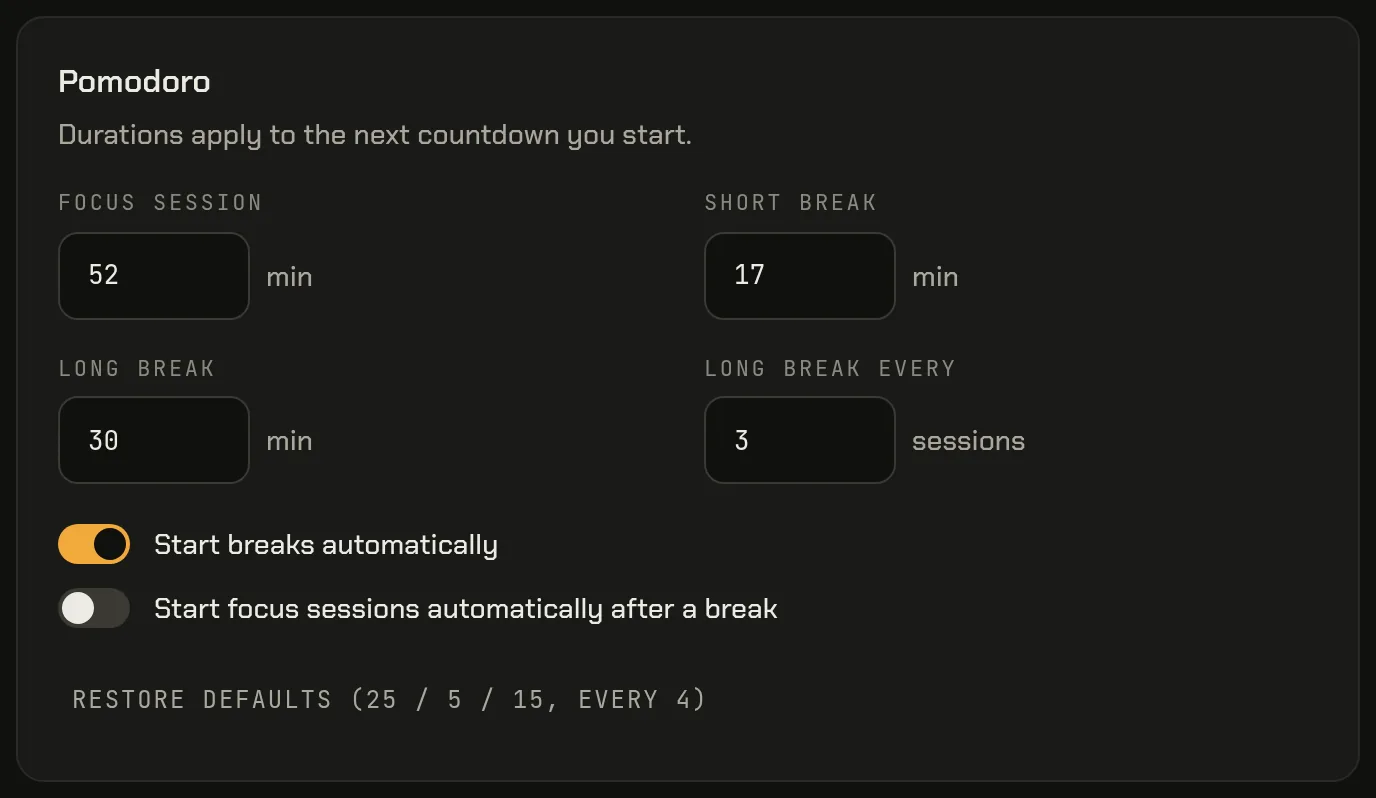
- In the Pomodoro card, set Focus session to 52.
- Set Short break to 17.
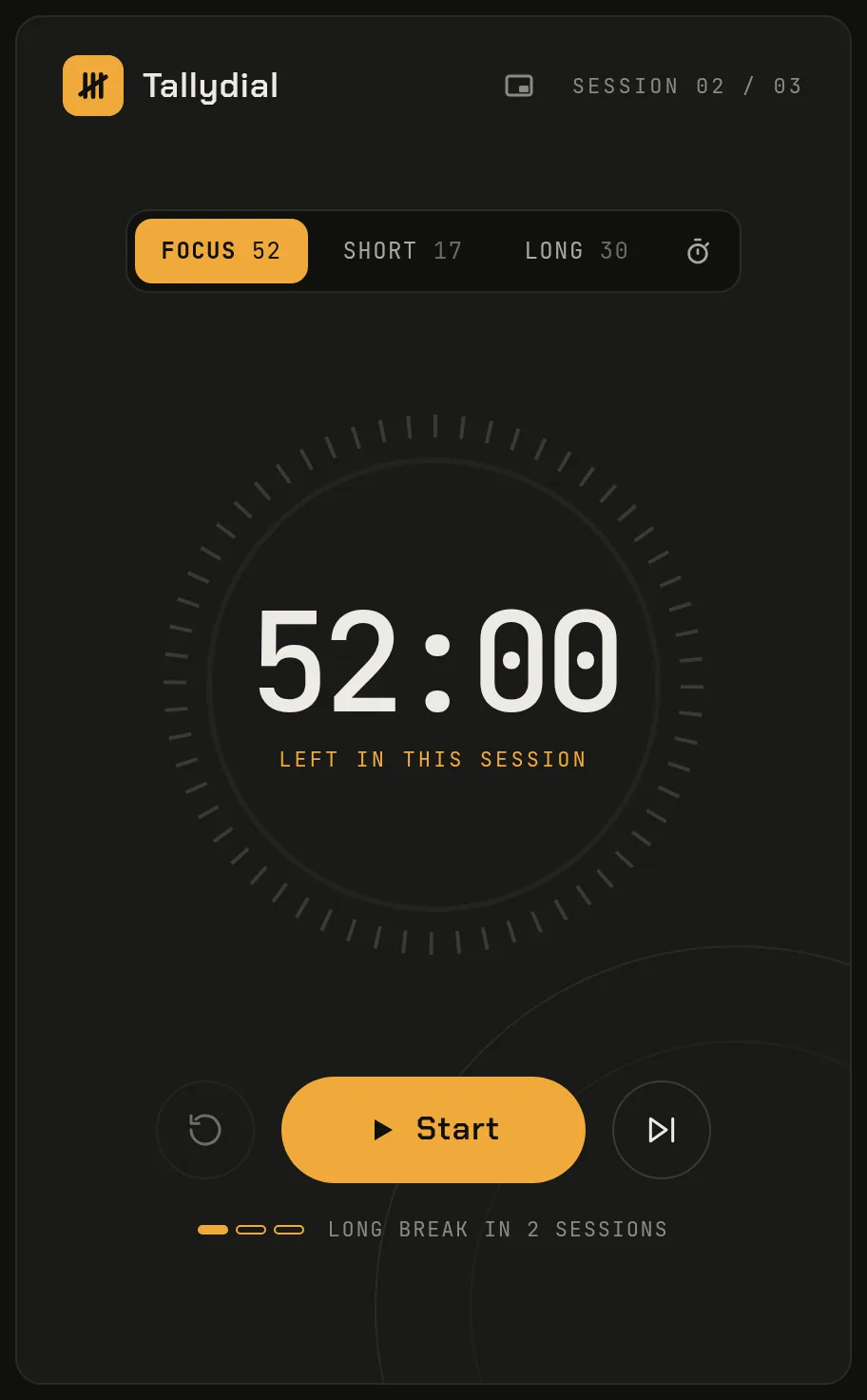
- Back on the timer, the Focus button above the dial reads 52, and an idle Focus countdown shows 52:00.
Changes save as you type. A running or paused countdown keeps its length; the new values apply from the next phase. The fields take whole minutes up to 180 for focus, 60 for a short break and 120 for a long break. A larger number is lowered to the limit when you leave the field.
Set 50/10 (or 90/20) the same way
For a 50/10 pomodoro, type 50 and 10. For 90/20, which some people use for long deep-work blocks, type 90 and 20; the clock then starts at 1:30:00. Restore defaults (25 / 5 / 15, every 4) takes you back to the classic setup.
Picking a long break interval for longer sessions
Long break every sets how many completed focus sessions come before the long break (1 to 12). The default of 4 suits 25-minute sessions: an hour and forty minutes of focus before the long break. With 52-minute sessions, four is nearly three and a half hours of focus.
Two options:
- A long break every 2 or 3 sessions, say 30 minutes, gives you a real pause mid-morning.
- Every break the same length, as in the original 52/17 figure: set Long break to 17 too.
The timer shows your place in the cycle, such as “Session 02 / 03” and “Long break in 2 sessions”. A focus session you skip doesn't count toward the long break.
Auto-start breaks and focus sessions: when to turn them on
Two toggles sit under the numbers:
- Start breaks automatically: the break begins when a focus session ends. Useful with long sessions, where it is easy to hear the chime and work straight through the break.
- Start focus sessions automatically after a break: good if you stay at your desk and want a steady rhythm. Leave it off if your breaks tend to run long, or a session will start, and record time on your task, while you're away.
With both on, the timer cycles until you pause it. By default a sound plays when each phase ends, and the Alerts card can add a desktop notification.
25/5 vs 50/10 vs 52/17
| Rhythm | Focus share | Suits | Drawback |
|---|---|---|---|
| 25/5 | 83% | Tasks you put off, admin, interrupted days | Rings just as deep work gets going |
| 50/10 | 83% | Writing, coding, design: work that is slow to get into | 50 minutes is harder to protect from interruptions |
| 52/17 | 75% | Long work where you want a real break from the screen | 17-minute breaks are easy to stretch |
25/5 and 50/10 have the same ratio: the difference is how often you stop, not how much you rest. No ratio is scientifically best; pick the one that fits your work.
How to check whether longer blocks helped
Give a rhythm a full week, then open Reports. It starts on the current week, and the left arrow goes back one, so you can compare a 25/5 week with a 52/17 week.
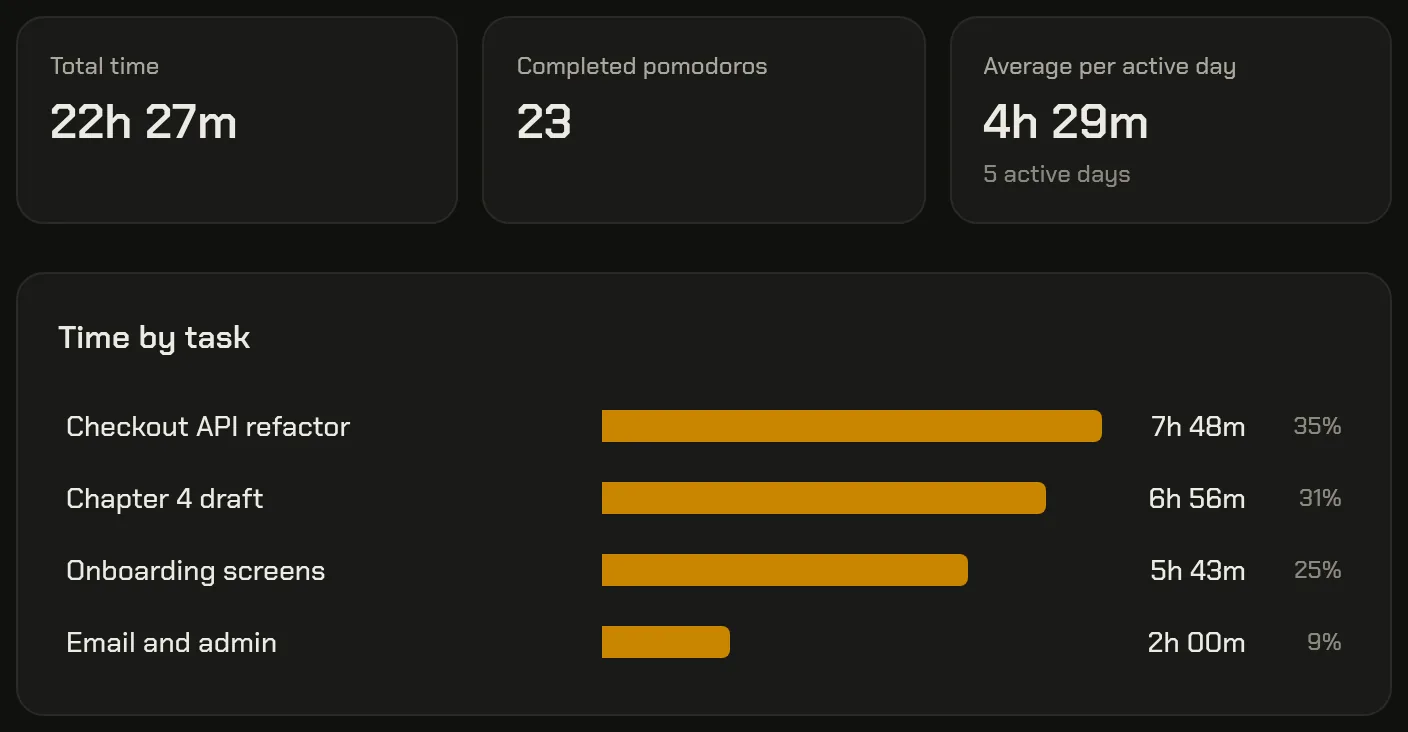
- Compare Total time, and the time on your deep-work tasks under Time by task.
- Don't compare Completed pomodoros directly: a 52-minute session counts as one pomodoro, like a 25-minute one, so the count drops when sessions get longer.
- The report doesn't record which lengths you used, so note the date you switched.
Then use your own judgment. Did you finish what you planned? Did the end of a long session still feel productive? Did you take the breaks? If your hard tasks got more time and you didn't end the day drained, keep the longer blocks. If not, go back, or try something in between, like 40/8. For how sessions are recorded per task, see how to track time per task with a pomodoro timer.
Try one long session today
Tallydial is free and needs no account. Open the timer, type your lengths into Settings, and run your first 52-minute session.